Key Takeaways
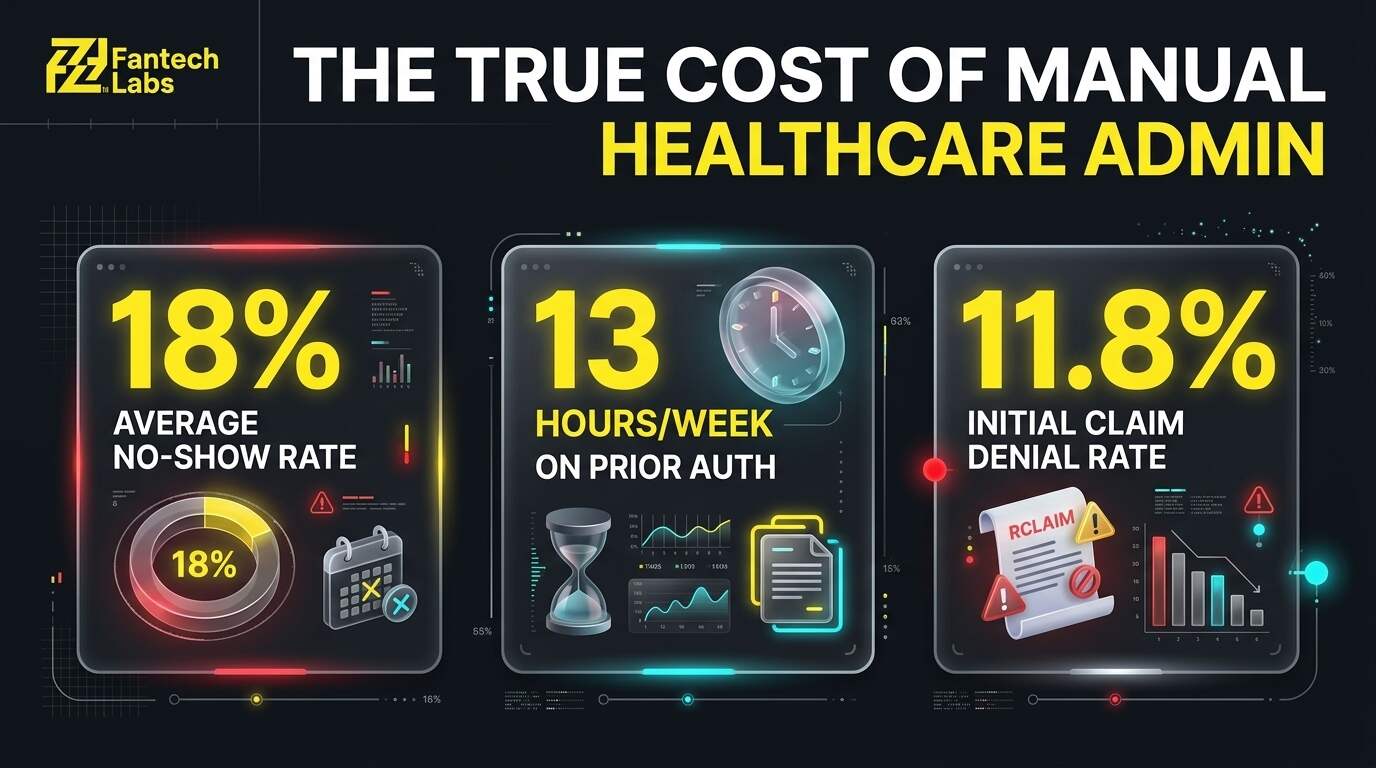
- Missed appointments cost the US healthcare system an estimated $150 billion a year, with the national average no-show rate sitting around 18%. Automated, two-way reminders are one of the few fixes with a well-documented track record of cutting that rate substantially.
- Prior authorization now consumes about 13 hours of physician and staff time per physician every week, and 40% of practices employ staff whose sole job is handling it, according to the AMA's most recent Prior Authorization Physician Survey.
- The all-payer initial claim denial rate sits at roughly 11.8%, and US practices see about $262 billion in claims initially denied every year, with roughly three in four of those denials traced back to administrative and paperwork errors rather than genuine medical necessity disputes, and reworking a single denied claim costs anywhere from $25 to $181 in staff time depending on complexity.
- A realistic starting budget for healthcare practice automation is $0 to $150 per month in off-the-shelf tools for a single workflow, with professionally built automation running $3,000 to $8,000 per workflow as a one-time cost.
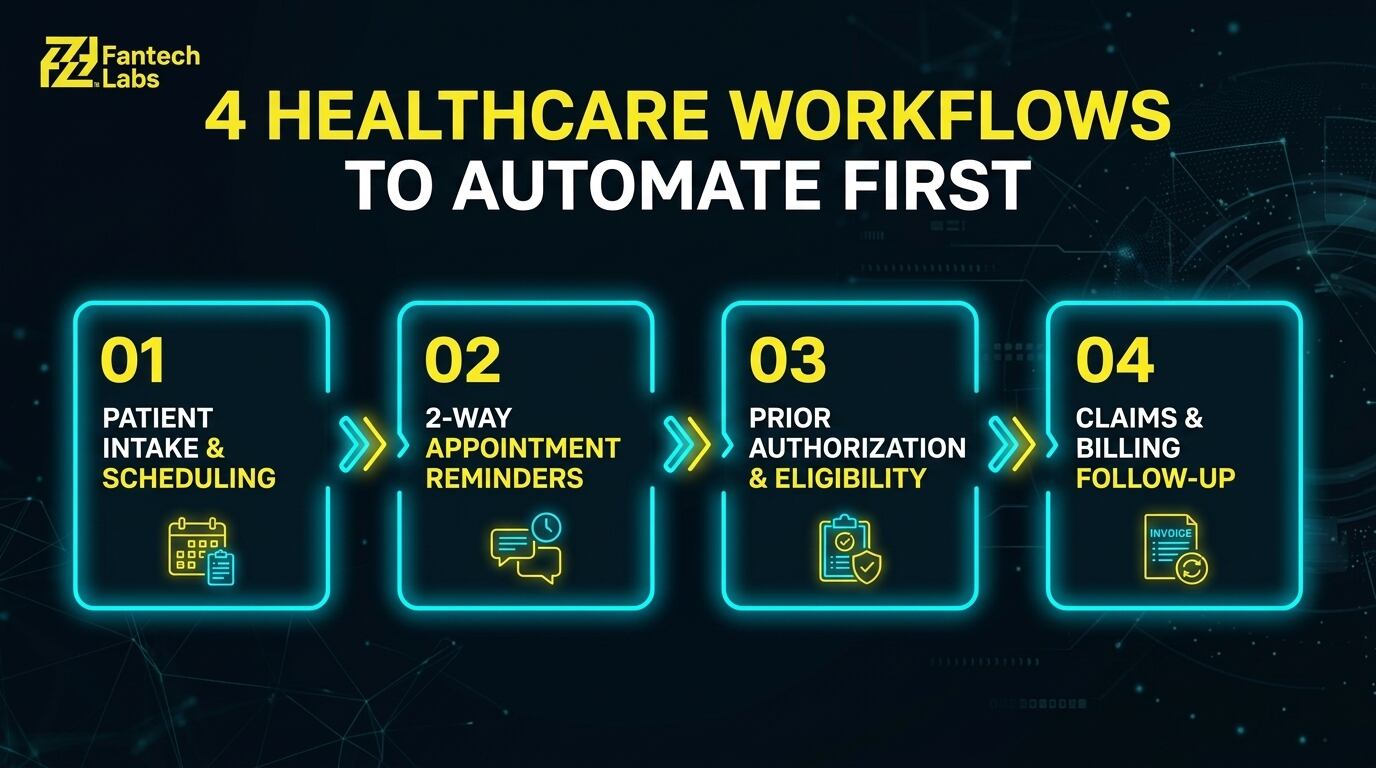
- The workflows that deliver the fastest return for a North American healthcare practice are patient intake and scheduling, appointment reminders and no-show reduction, insurance eligibility and prior authorization, and claims and billing follow-up.
- HIPAA in the US and PHIPA/PIPEDA in Canada aren't optional add-ons to an automation build, they're design requirements from day one, which is why a general-purpose automation vendor without healthcare experience is a real risk.
- See how Fantech Labs' AI integration services in Calgary approach this for healthcare clients across the US and Canada.
WHY HEALTHCARE PRACTICES ARE AUTOMATING NOW
A medical practice runs on a handful of repetitive processes that happen the same way, hundreds of times a month: a patient books, gets reminded, shows up (or doesn't), gets seen, and the visit gets billed. Every one of those steps generates administrative work that has nothing to do with clinical judgment, and all of it has gotten measurably more expensive to handle manually.
The numbers make the case on their own. No-shows alone cost the US healthcare system roughly $150 billion a year, and a typical independent practice can lose $150,000 or more annually to empty appointment slots. On the prior authorization side, the average physician now completes about 40 requests a week, burning through 13 hours of physician and staff time to do it, and 94% of physicians say the process contributes directly to burnout. On the billing side, nearly 80% of medical bills contain at least one error, and the all-payer initial denial rate is around 11.8%, with the bulk of those denials traced to data entry mistakes and missing information rather than anything clinical. None of that requires a doctor's judgment to fix. It requires a system that doesn't forget, doesn't get tired, and doesn't skip a step at 4:45 on a Friday.
There's a second factor pushing practices toward automation now: staffing. Front-desk and billing roles have some of the highest turnover rates of any administrative job, and every departure costs the practice institutional knowledge: which payers are difficult, which forms need extra attention, which patients need a call instead of a text. Automation doesn't replace that judgment, but it means the pattern-following parts of the job don't reset to zero every time someone new starts.
WHAT AI AUTOMATION FOR A HEALTHCARE PRACTICE ACTUALLY COVERS
AI automation for a medical practice connects the software a practice already runs, its EHR, scheduling system, patient portal, and billing platform, so that repetitive, pattern-based work happens without a staff member doing it by hand. The clinical and judgment-heavy work stays with the practice's team. The automation handles the parts that follow a predictable pattern every single time.
| Workflow | What Gets Automated | Why It Matters |
|---|---|---|
| Patient intake and scheduling | Online booking, form collection, insurance capture before the visit | Cuts front-desk time and reduces day-of paperwork delays |
| Appointment reminders | Automated, two-way SMS and email reminders with easy rescheduling | Directly reduces no-shows, the single biggest source of lost revenue |
| Insurance eligibility verification | Automatic eligibility checks ahead of the appointment | Catches coverage problems before the visit, not after |
| Prior authorization support | Pre-fills payer-specific forms, tracks submission status, flags what's outstanding | Cuts into the 13-hour weekly burden most practices carry |
| Claims submission and follow-up | Auto-generates clean claims, flags likely denials before submission, tracks follow-up | Reduces the error rate behind most initial denials |
| Patient billing and payment reminders | Automated statements, payment plan reminders, balance notifications | Speeds up collections without adding collections staff |
THE FOUR WORKFLOWS TO AUTOMATE FIRST
1. Patient Intake and Scheduling
Manual intake means a patient filling out the same information on a clipboard that's already in the system from their last visit, or a staff member re-keying it from a fax. An automated intake workflow sends digital forms ahead of the appointment, pulls insurance information automatically, and syncs it directly into the EHR before the patient walks in. The visit starts on time because the paperwork is already done.
2. Appointment Reminders and No-Show Reduction
This is usually the fastest win in the entire list. Research on telephone reminder systems found no-shows drop from 21% to 7%, about a two-thirds reduction, without adding any staff, and multi-channel automated reminders (SMS plus email) consistently outperform a single-channel approach. One widely cited field study found a clinic's no-show rate fall from 22% to under 9% within three months of switching to automated two-way text reminders. An automated reminder sequence sends a confirmation at booking, a reminder 48 and 24 hours out, and an easy one-tap rescheduling link, all without a staff member picking up the phone. About 15% of reminders do still generate an inbound call, so the front desk still needs capacity to handle that volume, but it's a fraction of what manual outbound calling requires. For a practice running 30 appointments a day, cutting the no-show rate by even 10 percentage points typically translates into tens of thousands of dollars in recovered annual revenue, well above what the automation itself costs to run.
3. Insurance Eligibility and Prior Authorization
Prior authorization consumes about 13 hours of physician and staff time per physician every week, and 40% of practices now employ someone whose entire job is managing it. An automation here checks insurance eligibility automatically ahead of the visit, pre-populates payer-specific prior authorization forms with data already in the EHR, and tracks submission status so nothing falls through without anyone noticing. It doesn't make the medical necessity decision, that stays with the clinician, but it removes nearly all of the paperwork around it.
4. Claims Submission and Billing Follow-Up
Roughly 11.8% of claims get denied on initial submission, and the majority of those denials come from administrative errors, missing information, eligibility mismatches, and coding mistakes, not genuine disputes over whether care was necessary. For a mid-size practice billing $1.5 million a year, an 11.8% denial rate can leave $50,000 to $120,000 in recoverable revenue sitting uncollected simply because nobody has the staff time to fight every denial. An automated claims workflow checks a claim against common denial triggers before it's ever submitted, flags likely problems for a human to review, and automatically follows up on claims that go unanswered past a set number of days instead of relying on someone remembering to check.
WHAT IT COSTS TO AUTOMATE A HEALTHCARE PRACTICE'S WORKFLOWS
| Implementation Type | What's Included | Typical Cost |
|---|---|---|
| DIY with off-the-shelf tools | Software subscriptions, self-configured | $0 to $150/month |
| Single workflow build (professional) | One defined process, common EHR/billing integrations | $3,000 to $8,000 one-time |
| Multi-workflow implementation | 3 to 4 workflows, discovery, testing, documentation | $10,000 to $30,000 one-time |
| Full practice automation system | Deep EHR integration, billing platform connections, ongoing support | $30,000 to $60,000+ |
| Monthly managed service | Monitoring, optimization, new workflow additions | $500 to $2,000/month |
For a solo or small practice automating its first workflow, appointment reminders are usually the best place to start. It's the least technically complex to build, it touches the fewest systems, and the revenue impact is immediate and easy to measure against a before-and-after no-show rate.
HIPAA, PHIPA, AND PIPEDA: WHY A GENERIC AUTOMATION VENDOR IS A RISK
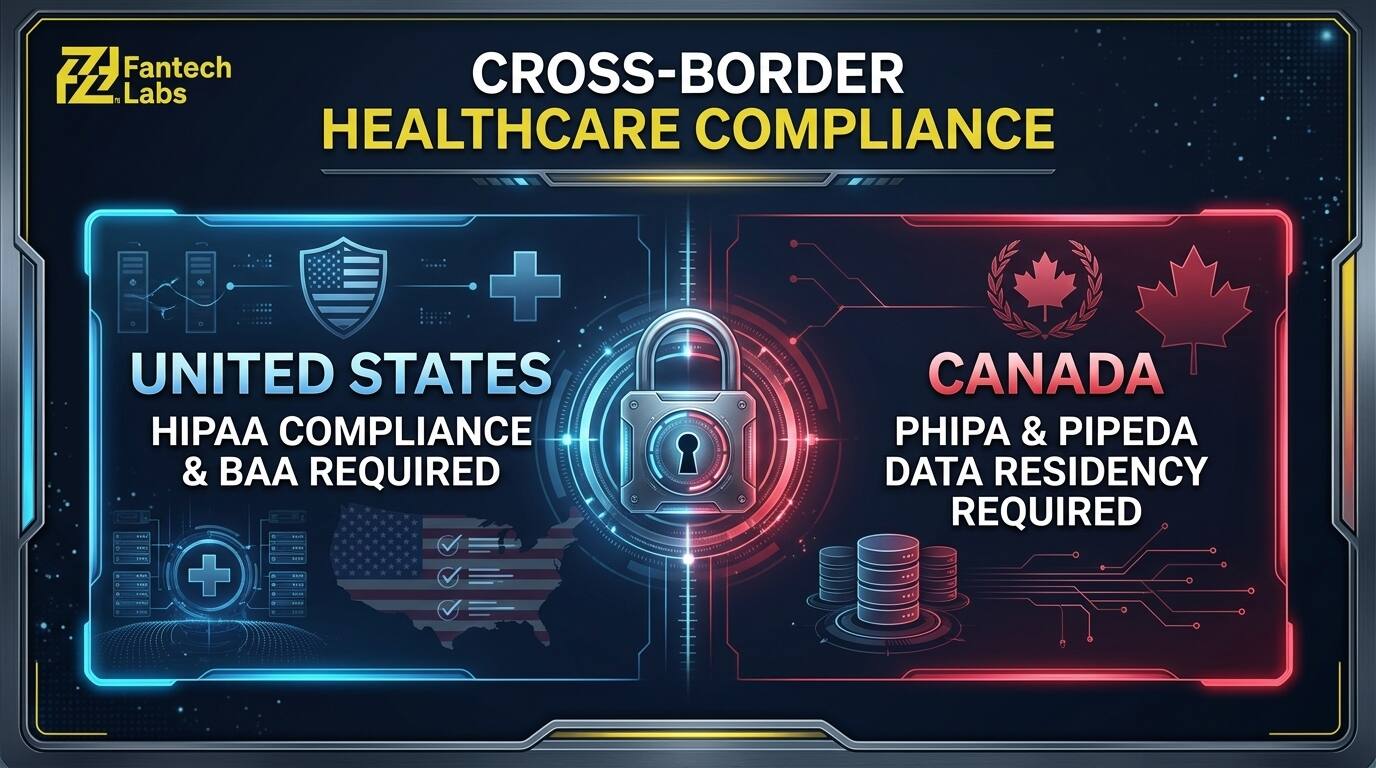
A medical practice's data isn't like a retailer's customer list. In the US, HIPAA governs how protected health information can be collected, stored, and transmitted, and that applies to every automated message, every synced record, and every third-party tool the automation touches. In Canada, PHIPA in Ontario and equivalent provincial legislation elsewhere, alongside PIPEDA at the federal level, impose similar requirements with their own specific rules around consent and data handling.
A general-purpose automation agency that's never built for healthcare often gets the trigger-and-action logic right while missing the compliance layer entirely: a reminder text with more clinical detail than it should carry, a form that isn't encrypted in transit, a vendor contract with no Business Associate Agreement attached. A partner with real healthcare experience treats these as design requirements from the first conversation, not something bolted on after the fact.
WHAT TO LOOK FOR IN A HEALTHCARE AUTOMATION PARTNER
| Factor | What Good Looks Like | Red Flag |
|---|---|---|
| Healthcare experience | Has built for other practices, references available | Generic case studies, no healthcare examples |
| HIPAA/PHIPA awareness | Raises compliance requirements unprompted | No mention of compliance in early conversations |
| EHR integration experience | Specific experience with your EHR platform | Hasn't worked with your specific system before |
| Process mapping before build | Discovery session before any proposal | Demo before understanding your actual workflows |
| Post-launch support | Defined support period, named contact | Hands it over and disappears after go-live |
| Transparent pricing | Itemized scope, no hidden charges | Lump sum quote with no breakdown |
Before signing anything, confirm there's a signed Business Associate Agreement where required, a clear answer on where patient data is stored and processed, and a defined post-launch support window. A vendor who can't answer the compliance questions plainly in the first conversation isn't the right fit for a healthcare build, regardless of how good the demo looks.
HOW FANTECH LABS BUILDS THIS
Fantech Labs is a Calgary-based AI automation and system integration company serving businesses, including healthcare practices, across Canada and the United States. Every engagement starts with a process mapping session, understanding exactly how a practice's intake, scheduling, and billing actually work today, before any automation gets built or any tool gets chosen. See Fantech Labs' AI integration services in Calgary for more on how that process-first approach applies across industries, healthcare included.
Support doesn't end at launch. Workflows get monitored and adjusted as a practice's EHR, payer mix, or regulatory requirements change, typically bundled as a monthly retainer once the initial build is live.
FREQUENTLY ASKED QUESTIONS
What should a healthcare practice automate first?
Appointment reminders, in almost every case. It's the fastest to build, touches the fewest systems, and has a direct, measurable effect on revenue through reduced no-shows. Insurance eligibility verification and prior authorization support are strong second choices once the first workflow is running reliably.
How much does AI automation cost for a medical practice?
A single professionally built workflow, like appointment reminders or eligibility verification, typically runs $3,000 to $8,000 one-time. A multi-workflow build covering 3 to 4 processes runs $10,000 to $30,000. Monthly managed service for ongoing support runs $500 to $2,000 depending on complexity.
Is AI automation for healthcare HIPAA compliant?
It can be, but it isn't automatically. Compliance depends on how the automation is built, which tools it connects to, whether a Business Associate Agreement is in place with every vendor involved, and how patient data is stored and transmitted. This needs to be a design requirement from the start of the engagement, not something checked after the build is finished.
How is healthcare automation different for US versus Canadian practices?
US practices need the automation built around HIPAA requirements, while Canadian practices need it built around PHIPA (or the equivalent provincial law) and PIPEDA. The underlying workflows (intake, reminders, eligibility, billing) are largely the same, but the compliance requirements, consent language, and data residency expectations differ, which is why a partner needs real experience on whichever side of the border a practice operates.
Does automating these workflows replace front-desk or billing staff?
No. It removes the repetitive, pattern-based parts of their job, re-keying the same patient data, manually dialing reminder calls, re-submitting claims that get stuck in limbo, so that staff spend more time on the parts of the job that actually need a person: handling a patient's question, resolving a tricky claim, managing the exceptions the automation correctly flags rather than tries to solve on its own.
How long does it take to build and launch a healthcare automation workflow?
A single, well-defined workflow like appointment reminders typically takes two to four weeks from the initial process mapping session to a live system, assuming it connects cleanly to the practice's existing EHR and scheduling software. Multi-workflow builds that touch billing and prior authorization usually run six to ten weeks, with most of that time spent on EHR integration testing and compliance review rather than the automation logic itself.
SUMMARY
The workflows draining the most time and revenue in a healthcare practice, no-shows, prior authorization, and claim denials, are also the ones with the clearest, best-documented case for automation. None of them require clinical judgment to fix. They require a system that handles the pattern reliably every time, built by a partner who treats HIPAA or PHIPA compliance as part of the design from day one rather than an afterthought. Starting with appointment reminders alone is usually enough to prove the case and fund the next workflow.
WHY TRUST THIS CONTENT
Fantech Labs is a Calgary-based AI automation and system integration company that builds workflow automation for businesses, including healthcare practices, across Canada and the United States. This piece is written by Zeeshan Haider, Ai Automation Specialist at Fantech Labs. Pricing figures reflect Fantech Labs' own scoping ranges; the no-show, prior authorization, and claim denial statistics cited above are independently sourced and linked so they can be verified directly.
DISCLAIMER
Costs, regulatory requirements, and industry figures reflect conditions as of 2026 and vary by practice size, specialty, and existing systems. This content is for general informational purposes and isn't legal or compliance advice; consult a healthcare compliance professional for guidance specific to your practice. Book a Free Automation Audit to get a scoped estimate based on your practice's actual workflows.